
Affiliate Disclosure: This article contains affiliate links. As an Amazon Associate and affiliate partner, I earn from qualifying purchases at no extra cost to you.
 Mena
MenaHey, this is Mena (@menachite), the hybrid mechanical-and-electrical engineer. I hear this complaint a lot in the field: “I bought an M20 cable gland and the thick cable won’t fit through.” Here’s the short version up front: M20 is not “the cable’s thickness” — it’s the mounting thread spec. Let’s work through exactly what to check so you don’t make that mistake.
The short version of how to pick a cable gland: ① measure the cable’s outer diameter → ② check the mounting thread size (or hole) on the enclosure → ③ pick a gland whose clamping range covers that outer diameter → ④ decide the IP rating you need → ⑤ pick a material that suits the environment. Follow that order and you won’t go wrong. Just remember up front that M20/M25 is step ② (the mounting thread) — not step ① (the cable’s thickness). Those are two completely different things.
Check the quick-reference table below to see roughly where your situation falls, then read on for the details.
| Situation | Typical cable OD | Mounting thread | Recommended IP rating | Typical clamping range |
|---|---|---|---|---|
| Indoor control panel / breaker box | ~8mm | M20 | IP65–67 | 6–12mm-rated gland |
| Outdoor wiring (exposed to rain) | ~10mm | M20 | IP67 or higher | ~6–12mm-rated gland |
| Shielded cable | depends on cable | Match existing (often M20) | IP67+, consider EMC-rated | Match the cable’s actual OD |
If you want the concrete numbers for your exact situation, feel free to skip ahead to the “real-world selection examples” section later in the article. For now, let’s start from the basics.
What is a cable gland?
A cable gland is a fitting mounted where a cable enters a control panel or equipment enclosure. It does four main jobs: ① secures the cable to the enclosure (strain relief, so pulling on the cable doesn’t stress the cable or the internal terminals), ② seals the gap between the enclosure hole and the cable against dust and water, ③ where needed, grounds the cable’s shield/braid to the enclosure for EMC purposes, and ④ physically protects the cable at the entry point.
The relevant standard for cable gland construction and performance is IEC 62444 (Cable glands for electrical installations), and most glands covered by that standard use metric threads (M16, M20, M25, etc.) as defined in IEC 60423 for their mounting thread. The next section covers what M20/M25 actually specify.
What do M20 and M25 actually size?
“M20” and “M25,” which show up constantly in cable gland model numbers, describe the metric thread on the side that mounts into the enclosure. The “M” means metric thread, and the number that follows is the thread’s nominal diameter in mm. For M20, the thread’s outer diameter is about 20mm, and the pitch (thread spacing) is 1.5mm on most products. In other words, M20 doesn’t mean “a 20mm cable fits through” — it means “the mounting hole/thread you cut or drill into the enclosure is the M20 metric spec.”
So where do you actually check what cable diameter fits? That’s the “clamping range,” covered next. Product listings describe it as Cable Diameter, Clamping Range, or Cable Range. Even among M20-threaded products, the clamping range varies by product — 6–12mm, 7–11mm, 10–14mm, and so on. Don’t decide based on the “M20” label alone; always check the actual clamping-range numbers.
5 things to check before picking a cable gland
Check these five things in order before you buy, and you won’t get stuck.
① Cable outer diameter
Measure the thickest part of the actual cable you’re using (outer diameter, including the outer jacket and any shield) with calipers or a tape measure. Don’t rely on catalog numbers alone — measure the actual cable.
② Enclosure-side mounting size
Check whether the enclosure already has a hole cut to a thread spec (like M20) or whether you’ll be cutting one. Also check the panel thickness, whether you need a locknut or sealing washer, and whether there’s room inside the enclosure for the gland body. If you’re retrofitting, check the enclosure hole conditions (spec and panel thickness) before buying the gland — not the other way around.
③ Clamping range
Check that the outer diameter you measured in step ① actually falls within the product’s clamping range (supported cable diameter). A cable that lands near the middle of the range, rather than right at the edge, gives you more margin and a more stable seal.
④ Required IP rating
Decide the IP rating you need based on the installation environment (indoor vs. outdoor, exposure to water, dust levels). More detail below.
⑤ Material and use environment
Whether nylon, brass, or stainless steel is the right call depends on whether it’s indoors or outdoors, and whether corrosive gases or chemicals are present. More detail below.
Common selection and installation mistakes on site
MenaHere’s something I’ve actually run into on site. Someone ran several wires together through one oversized rubber grommet hole, and oil from the equipment leaked in through the gaps. The fix in a case like that is to go entry by entry, and replace the affected one with grommets sized for the actual number of wires, running one wire through each.
Sealing parts like rubber grommets and cable glands are fundamentally built to seal on the assumption of “one cable per hole, and only a single cable within the supported clamping range.” Force multiple cables through a hole meant for one, and irregular gaps form between the cables, and between the cables and the seal material — and that’s exactly where water, oil, and dust get in.
This isn’t something a higher IP number fixes. Ratings like IP67 and IP68 only mean the product passed a test under specified conditions (specified pressure, duration, clean water, etc.) — if the correct installation practice behind that rating (one cable per hole, within the supported diameter range) isn’t followed, you won’t actually get the protection the rating implies. The right mental model isn’t “it’s IP68, so anything goes” — it’s “it’s only IP68 if installed correctly.” We’ll come back to this in the IP-rating section below.
Manufacturers do make multi-hole cable glands and grommets designed to carry several cables through one fitting, but these have a purpose-built internal rubber seal designed for multiple holes and multiple cables — it’s a completely different thing from cramming several cables into a standard single-cable product. If you need to bring in multiple cables through one entry point, choose a multi-hole product from the start.
The practical rule is simple: provide one cable gland (or grommet hole) per wire, pick each one to match its cable’s actual diameter, and never bundle multiple cables through one hole. Following just these three points prevents the vast majority of water/oil ingress problems like the one above.
Matching cable diameter to clamping range
Product spec sheets list the supported cable diameter as Cable Diameter, Clamping Range, or Cable Range. Even with the same M20 thread, clamping range varies by product — 6–12mm, 7–11mm, 10–14mm, and so on. Pick a product where the cable OD you measured in step ① falls within that range, ideally toward the middle rather than right at an edge.
Forcing a cable right at the top of the range through can leave it under-clamped and hurt the seal; a cable right at the bottom of the range risks over-tightening and damaging the cable jacket. When in doubt, don’t just size up — pick the product whose range centers on your measured diameter.
The difference between IP65, IP66, IP67, and IP68
The IP code is an enclosure protection rating defined in IEC 60529 (an international standard). Of the two digits following “IP,” the first (dust protection) ranges 0–6, and the second (water protection) ranges 0–9. This notation is used both for cable glands on their own and for the water/dust protection of an entire enclosure.
| Rating | Rough meaning |
|---|---|
| IP65 | No dust ingress (first digit 6). Protected against water jets from any direction (second digit 5). |
| IP66 | No dust ingress. Protected against powerful water jets (second digit 6). |
| IP67 | No dust ingress. No harmful effects from temporary immersion at a specified depth/time (second digit 7). |
| IP68 | No dust ingress. Withstands continuous submersion under conditions specified by the manufacturer (second digit 8). |
The important thing here: an IP68 rating does not mean “completely waterproof against any liquid, unconditionally.” The tests are generally run with clean water under specified pressure, duration, and depth — they don’t guarantee resistance to oil or chemicals, or performance beyond the tested pressure/depth. And as covered above, these numbers assume correct installation (one cable per hole, within the supported clamping range). For outdoor use or demanding environments, check the manufacturer’s actual test conditions in the spec sheet, not just the rating number.
Nylon vs. brass vs. stainless steel
Let’s go through cable gland materials in detail. There are three main families — nylon (resin), brass (usually nickel-plated), and stainless steel — and each suits a different environment. There’s no single “best” material across the board.
| Material | Characteristics | Good environments |
|---|---|---|
| Nylon (e.g. PA66) | Lightweight, inexpensive, electrically insulating. Most products rate roughly -40 to +100°C. | General indoor control panels, DIY junction boxes, etc. |
| Brass (usually nickel-plated) | Metal strength and impact resistance. Bare brass oxidizes easily, so most products are nickel-plated. | General industrial use. Corrosion resistance depends on the condition of the plating. |
| Stainless steel (SUS304/316, etc.) | Strong corrosion and environmental resistance. Pricier. 316-grade holds up better against salt and chemicals. | Outdoors, coastal/salt-exposed areas, environments with chemical exposure. |
Two things worth flagging: with brass, if the nickel plating on the surface degrades or gets scratched, corrosion can start from that point; with nylon, heat resistance and chemical resistance both vary by product. You can’t just simplify it to “metal is always stronger than resin” or “stainless is always safe” — the right approach is to weigh the actual plating finish or resin grade against the installation environment.
What to pick for indoor, outdoor, and control-panel use
| Environment | Typical IP rating | Typical material |
|---|---|---|
| Indoor control panel / breaker box (no water exposure) | IP65–67 | Nylon is usually enough |
| Outdoor (rain exposure, direct sun) | IP67 or higher | Stainless steel, or brass with good plating |
| Coastal / chemical-exposure areas | IP67 or higher | Stainless steel (consider 316-grade) |
For an indoor control panel with little risk of water exposure, nylon is enough for the large majority of cases, thanks to its good cost/weight balance. For outdoor or rain-exposed installations, aim for IP67 or higher and lean toward metal (stainless, or brass in good condition) considering UV degradation and impact — that order of thinking keeps the decision simple.
Do shielded cables need an EMC-rated gland?
When using a shielded (braided) cable, a standard cable gland and an EMC-rated one play different roles. A standard gland mainly handles securing the cable and sealing against dust/water; an EMC-rated gland makes direct contact with the cable’s shield layer via an internal contact (a spring or ring-shaped contact) and grounds it through the enclosure, keeping the shield continuous and suppressing electromagnetic noise ingress/radiation. IEC 62444, the construction and performance standard for cable glands, also covers this kind of shield-handling design.
One thing worth flagging: it’s not accurate to say “shielded cable always requires an EMC gland.” Whether you need one depends on the overall equipment’s grounding design and shielding policy (where the shield gets tied to the enclosure). If the shield is already properly grounded elsewhere in the design, it’s completely normal for the cable entry point to use a standard gland that only handles sealing and strain relief. If you’re unsure, follow the equipment designer’s or manufacturer’s spec sheet.
EMC-rated cable glands tend to be treated as professional wiring materials, and as of this writing (September 2026), I wasn’t able to confirm a consumer-facing, in-stock listing on Amazon. In practice, searching by model number through an industrial supplier that specializes in control-panel components is the realistic route.
Real-world selection examples
Let’s walk through everything above using three concrete examples.
Indoor control panel example (8mm cable, standard metric mount, indoor, no environmental resistance needed)
Say the cable OD is 8mm, the enclosure mount is M20, and the installation is an indoor control panel with no water exposure. Here, picking an M20 product with roughly a 6–12mm clamping range puts the 8mm cable comfortably near the middle of the range. Since there’s no water-exposure risk, IP65–67 is plenty, and nylon is fine given the priority on cost and weight.
Outdoor wiring example (10mm cable, standard metric mount, rain exposure, needs dust/water protection)
Say the cable OD is 10mm, the mount is M20, and the installation is outdoors with rain exposure. Here, first set the target IP rating to 67 or higher, then pick an M20 product with roughly a 6–11mm or 10–14mm clamping range where the 10mm cable falls near the middle. For material, lean toward stainless steel considering UV degradation, impact, and long-term plating wear.
Shielded cable example
For a shielded cable, first check ① the cable’s actual OD (measured including the shield layer) and ② the enclosure-side mounting size as usual, then ③ decide whether you need an EMC-rated gland based on the overall equipment’s grounding and shielding design. If the design calls for one, pick a product whose clamping range and mounting thread match, checking the manufacturer’s documentation as you go.
Recommended cable glands
Building on everything above, here are cable glands I was able to confirm in stock and genuinely available on Amazon, organized along two axes: material (nylon, stainless, brass) and structure type (standard vs. multi-hole). First, check the quick-reference table below for which structure type fits your situation.
| Structure type | When to pick it | When to skip it |
|---|---|---|
| Standard (single-cable) | The common case: one cable through one hole | – |
| Multi-hole | Bringing several thin control/signal cables through one entry point (the “correct” version of the oil-ingress story above) | A single thick power cable, or when the hole count/size doesn’t match your actual cables |
| Split-body type | Feeding through a cable that already has a connector or terminated end, without cutting it | Standard type is fine for raw, unterminated wire |
| EMC type | Grounding a cable’s shield/braid to the enclosure for noise control | May be unnecessary if shielding/grounding is already handled elsewhere in the design |
| Breather type | Preventing condensation or housing deformation from pressure differentials caused by temperature swings | Standard type is fine if all you need is basic sealing and strain relief |
Let’s start with standard-type products, looking at real items across materials (nylon, stainless, brass) and, within nylon, across sizes (M20 vs. M25).
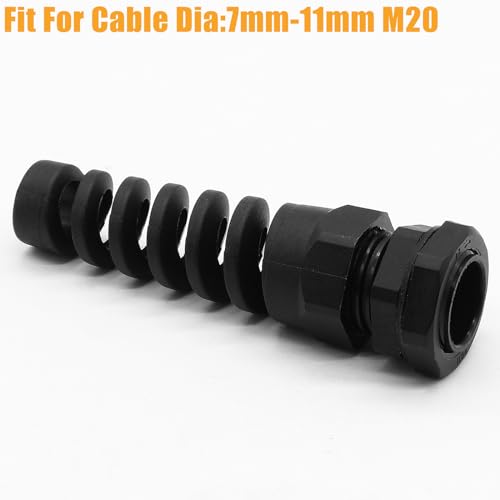
Rierdge M20 Cable Gland (Nylon PA66, IP68, 2-Pack)


 Mena
MenaReasonably priced, and more than enough for an indoor control panel or a DIY breaker box. Hand-tighten it, then give it a light extra turn with a wrench and you’re set.
This Rierdge cable gland is one of the few genuine M20-size products that explicitly states nylon PA66 as its material. Its supported cable OD is 7–11mm, which covers most of the thinner control and power wiring used in indoor panels.
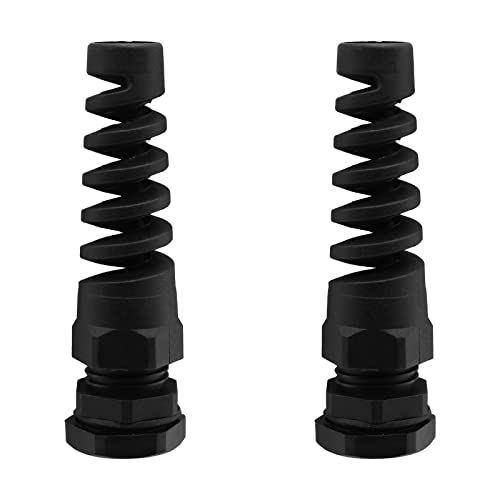
It’s rated IP68, but as covered above, an IP rating is only a statement that it passed a specified test condition. For an indoor panel with no water exposure, IP65–67-class protection is usually plenty in practice; if you do use it outdoors, also check whether the mounting hole needs a sealing washer, and give it that extra turn.
uxcell M25 Cable Gland (Nylon, Waterproof, with Strain Relief)



Still nylon, but one size up from M20. If your cable is thicker, or you’ve bundled multiple conductors into one distribution cable that won’t fit an M20’s clamping range, consider this size instead.
Its supported cable OD is 13–18mm, skewing thicker than the M20 pick above, and it’s nylon-based per the manufacturer’s listing. Use this as a concrete example of how the same metric “M” thread family covers very different cable thicknesses depending on the size — M20 and M25 support quite different diameter ranges. The enclosure-side mounting hole also needs to be cut to match M25.
ToolRise Stainless Steel Cable Gland (SUS304, M20, IP68)
MenaFor outdoor, coastal, or chemical-exposure environments, this is the stainless option worth considering before nylon. It costs more, but the corrosion resistance is in a different league.
This is an M20×1.5 cable gland with a body, locknut, and seal nut explicitly listed as SUS304 stainless steel. In outdoor rain-exposed locations, or environments with salt or chemical exposure, it has a corrosion-resistance edge over nylon or standard nickel-plated brass.
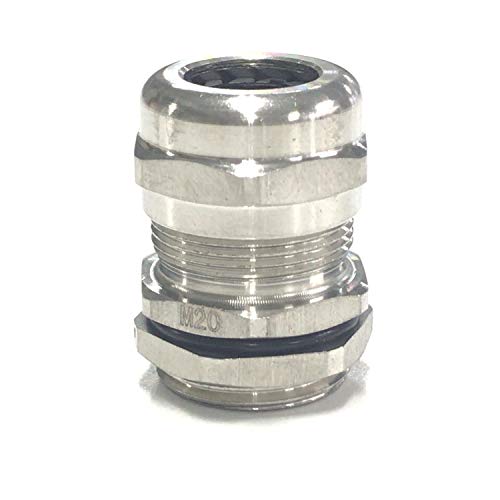
Its supported cable OD is around 6–12mm, which comfortably covers a roughly 10mm outdoor cable.
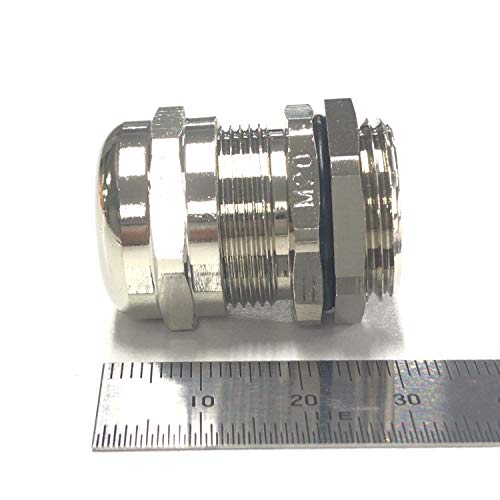
Begot Nickel-Plated Brass Cable Gland (M20, IP68)
MenaNickel-plated brass has the strength you’d expect from metal. Just be aware that once the plating gets scratched, corrosion can start from that point — for salt-exposed areas, stainless is the safer bet.
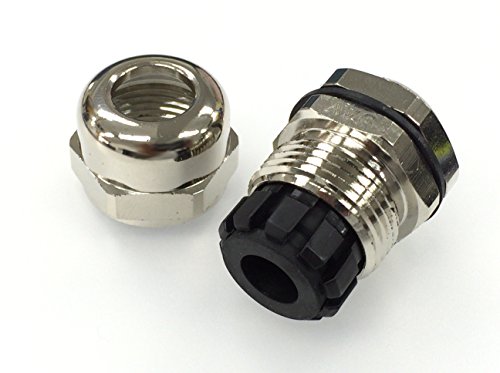
This M20 gland is made of nickel-plated brass with a clamping range of roughly 6–12mm, a good fit for the thinner control wiring found in many indoor panels.
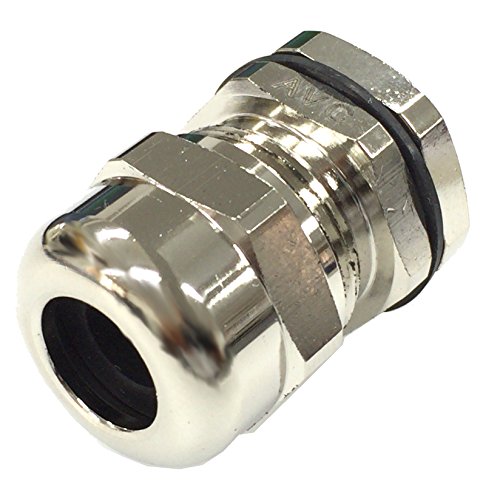
Nickel-plated brass has real metal strength and impact resistance, but the key point is that it’s plated, not solid brass exposed to the environment. Once the plating layer is scratched, corrosion can progress from that point, so for outdoor or salt-exposed environments, stainless steel (like the SUS304 option above) is the safer choice.
Multi-hole type: bringing in several cables through one entry point
The three products above were all “one cable, one hole” standard types. If you need to bring in several thin control or signal wires through a single entry point, choose a multi-hole gland with multiple independent openings from the start. As covered in the oil-ingress story earlier, forcing multiple cables through a standard single-cable hole is exactly the failure pattern to avoid.
MenaThis one runs one cable through each of three independent holes — it’s a completely different thing from cramming multiple cables into a single hole. Use it within the maker’s stated IP68 rating and per-hole cable diameter (about 2.6mm per hole).
This M12-size gland has three holes with a locknut and washer, sealing one roughly 2.6mm-diameter cable through each of its three independent openings. It’s built for bringing in several thin cables at once — sensor or signal lines, for example — not for a single thick power cable. If the hole count or supported diameter doesn’t match what you actually need to run, look for a different multi-hole product that fits your specific cable count and sizes.
Split-body type: feeding through a cable that’s already terminated
A split-body (two-piece) cable gland is one whose body splits into two or more parts. A cable with a connector or terminal already attached, or a pre-molded cable end, can’t be threaded through a standard one-piece gland — the connector is in the way. A split-body gland lets you install it without cutting the cable or removing the connector. As of this writing I wasn’t able to find a consistently in-stock match on Amazon, so I’m not forcing a product card here. In practice, searching an industrial connector/electrical-supply distributor for “split-body cable gland” or “two-piece cable gland” by model number is the realistic path.
EMC type and breather type: being upfront about niche use cases
EMC-rated glands, as covered above, are a specialty product for grounding a shielded cable’s braid to the enclosure for noise suppression, and may be unnecessary depending on the overall equipment’s grounding design. Breather-type glands are a specialty type used in outdoor installations where temperature swings create pressure differentials between inside and outside the enclosure — they let air through while blocking water, preventing condensation and housing deformation. If all you need is basic sealing and strain relief, the standard type covers it, and the situations calling for either of these specialty types are fairly limited. As of this writing I couldn’t confirm an in-stock, verified match for either on Amazon, so I’m leaving both without a product card rather than forcing one. If you need either in practice, the same approach applies: search by model number through an industrial electrical-supply distributor.
Accessories worth having alongside a cable gland
Beyond the gland itself, these two make the selection and installation process go more smoothly. Think of this as an explanation of the use case rather than a recommendation for one specific model.
Calipers for measuring cable outer diameter
This is the tool for step ① (cable outer diameter) covered above. A tape measure gets you in the ballpark, but if you’re picking a product right at the edge of its clamping range, measuring to the nearest 0.1mm with calipers helps avoid a selection mistake.
This is an analog caliper with a 0–150mm measuring range and 0.05mm resolution — no battery to worry about, and you can measure a cable’s OD right away. If you want to go deeper on how calipers work and how to choose one, our separate guide on choosing a caliper covers that.
Replacement sealing washers / gaskets
On outdoor-installed cable glands, the rubber sealing washer or gasket often ages faster than the gland body itself. Most manufacturers supply replacement washers separately, so for critical outdoor equipment, keeping a spare on hand means you can swap it in quickly when needed.
Things to watch for when installing a cable gland
Finally, here’s a rundown of things that are easy to miss during installation.
· Tighten to roughly the manufacturer’s recommended torque — hand-tight, then a light extra turn is enough. Over-tightening can damage the cable jacket or the rubber seal.
· Check that the panel thickness matches the thread length. Too thick a panel and the thread won’t reach fully; too thin and the locknut may not seat properly.
· Whether a sealing washer or locknut is required varies by product — check what’s included before you buy.
· Rubber gasket parts harden and degrade over time. For outdoor installations, periodic visual inspection is a good idea.
· And as shown in the real example earlier: the golden rule is one cable per hole, within the supported clamping range. If you need to bring in multiple cables, choose a multi-hole product from the start.
MenaIf you’ve read this far, you should be able to work out the clamping range, IP rating, and material you need yourself, just from your cable’s diameter, your enclosure’s thread spec, and your installation environment. All that’s left is finding the actual product that fits.
Bottom line
The cable gland selection process is five steps: ① measure the cable’s actual outer diameter → ② check the enclosure-side mounting thread spec (M20, etc.) → ③ pick a product whose clamping range covers that outer diameter → ④ decide the IP rating your environment needs → ⑤ pick a material (nylon, brass, or stainless) that suits that environment. M20/M25 is only the mounting-thread spec — not the cable’s thickness itself.
And an IP rating isn’t “the higher the number, the more it blocks” — that protection only holds up when correct installation (one cable per hole, within the supported clamping range) is in place to begin with. Use the quick-reference table from the start of this article as your final check before you buy.